
Ordering Seminar Replay
Overview
Adding Seminar Replay to your campaign allows you to extend the life of your event and reach registrants who couldn’t attend live. Advisors can easily add this feature through Trailmap or by contacting Steep Support.
There are three simple ways to order or upgrade your campaign to include Seminar Replay:
1. When Placing Your Campaign Order
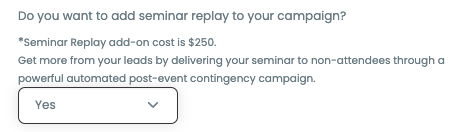
When submitting a new campaign order inside Trailmap, navigate to the final step (Finish tab) of the order form.
You’ll see a prompt labeled:
“Do you want to add Seminar Replay to your campaign?”
2. Upgrading an Existing Campaign
If you’ve already placed your order and want to add Seminar Replay later:
Go to your Trailmap Event Overview page.
Select the campaign you would like to add seminar replay to
on the right hand side of the dashboard, select Upgrade to seminar replay.
Once selected, our team will update your campaign configuration accordingly.
3. Email Steep Support
If you’d prefer hands-on assistance with adding Seminar Replay, simply email support@steep.marketing and include:
Your campaign name or event title
A short note requesting the Seminar Replay upgrade
Our support team will confirm the addition and ensure your replay is fully configured.
What our team will need to set up your Seminar Replay campaign:
The video of your seminar
The link you'd like to use for your CTA