
Adding users to your Trailmap account
Who can add new users?
Only users with an Administrator role have permission to add new users in Trailmap. Standard users do not have access to this feature. You're welcome to set up users for anyone in your organization who needs access - do not create users or share access to members outside of your organization.
Q: How do I add a new user?
Follow these steps to add a user in Trailmap:
Log in to your Trailmap account.
On the left-hand side, under the Administration section, Select Users.
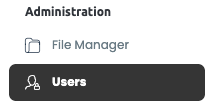
On the Users page, locate the New User button on the right-hand side of the screen.

Click New User and fill out the required information:
Name – The full name of the new user.
Primary Email – The user’s main contact email.
Username – We recommend using the same email for simplicity.
Set the User Role (Standard or Administrator) based on their level of access.
Click Add to complete the process.

Q: What happens after a new user is added?
Once added, the new user will automatically receive an activation email from Trailmap.
The email contains an activation link prompting them to set their password.
After setting their password, they will be able to log in and access Trailmap according to their assigned role.